Note
Go to the end to download the full example code.
Higher Resolution#
flow_view’s box size has two independent levers: scale_xy scales each box’s spatial
(width/height) extent, and scale_z scales its depth (channel count). Both are clamped by
min_xy/max_xy and min_z/max_z - if a box’s computed size is already sitting at one
of those floors, raising the corresponding scale won’t visibly change anything until it pushes
past that floor. With the defaults (min_z=10, scale_z=0.1), any layer with fewer than 100
channels is already clamped to the same minimum depth - so bumping scale_z alone may look like
it did nothing unless you push it far enough to clear that floor.
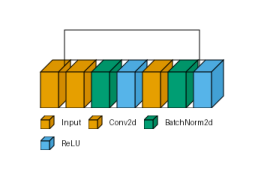
Conv2d is orange, BatchNorm2d is green, and ReLU is sky blue.
from collections import defaultdict

import matplotlib.pyplot as plt
import torch
import visualtorch
from torch import nn


class ResidualBlock(nn.Module):
    """A classic ResNet-style block with a plain identity shortcut."""

    def __init__(self, channels: int) -> None:
        super().__init__()
        self.conv1 = nn.Conv2d(channels, channels, kernel_size=3, padding=1)
        self.bn1 = nn.BatchNorm2d(channels)
        self.relu = nn.ReLU()
        self.conv2 = nn.Conv2d(channels, channels, kernel_size=3, padding=1)
        self.bn2 = nn.BatchNorm2d(channels)

    def forward(self, x: torch.Tensor) -> torch.Tensor:
        """Define the forward pass, with a skip connection around conv1/bn1/relu/conv2/bn2."""
        identity = x
        out = self.relu(self.bn1(self.conv1(x)))
        out = self.bn2(self.conv2(out))
        out = out + identity
        return self.relu(out)


model = ResidualBlock(channels=8)

input_shape = (1, 8, 16, 16)

color_map: dict = defaultdict(dict)
color_map[nn.Conv2d]["fill"] = "#E69F00"
color_map[nn.BatchNorm2d]["fill"] = "#009E73"
color_map[nn.ReLU]["fill"] = "#56B4E9"

dpi = 150  # rendered at 2x this in the final doc build (savefig.dpi=300 in conf.py)
Default#
At the default scale_xy=1 and scale_z=0.1, this 8-channel model’s boxes are already
clamped to the smallest allowed depth (min_z=10).
img_default = visualtorch.render(model, input_shape, style="flow", color_map=color_map, legend=True)

plt.figure(figsize=(img_default.width / dpi, img_default.height / dpi), dpi=dpi)
plt.imshow(img_default)
plt.axis("off")
plt.tight_layout()
plt.show()
Higher Resolution#
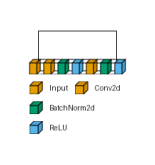
scale_xy=3 grows the spatial extent immediately. scale_z=3 needs to clear
min_z / channels (here 10 / 8) before it visibly changes the depth at all - past that
point, both dimensions scale up together for a substantially bigger result.
img_hires = visualtorch.render(
    model,
    input_shape,
    style="flow",
    color_map=color_map,
    legend=True,
    scale_xy=3,
    scale_z=3,
)

plt.figure(figsize=(img_hires.width / dpi, img_hires.height / dpi), dpi=dpi)
plt.imshow(img_hires)
plt.axis("off")
plt.tight_layout()
plt.show()