

Note
Go to the end to download the full example code.
Ignore Layers#
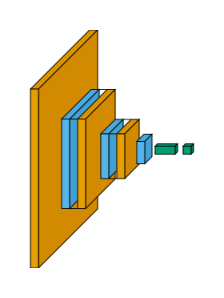
Visualize some layers only. type_ignore hides layer types you don’t care about (here, ReLU
and Flatten); show_input=False is the same idea applied to the synthetic input box itself -
both trim the diagram down to just the layers worth looking at.
import matplotlib.pyplot as plt
import visualtorch
from torch import nn

# Example of a simple CNN model using nn.Sequential
model = nn.Sequential(
    nn.Conv2d(3, 16, kernel_size=3, padding=1),
    nn.ReLU(),
    nn.MaxPool2d(2, 2),
    nn.Conv2d(16, 32, kernel_size=3, padding=1),
    nn.ReLU(),
    nn.MaxPool2d(2, 2),
    nn.Conv2d(32, 64, kernel_size=3, padding=1),
    nn.ReLU(),
    nn.MaxPool2d(2, 2),
    nn.Flatten(),
    nn.Linear(64 * 28 * 28, 256),  # Adjusted the input size for the Linear layer
    nn.ReLU(),
    nn.Linear(256, 10),  # Assuming 10 output classes
)

ignored_layers = [nn.ReLU, nn.Flatten]

input_shape = (1, 3, 224, 224)
img = visualtorch.render(
    model,
    input_shape=input_shape,
    style="flow",
    type_ignore=ignored_layers,
    show_input=False,
)

dpi = 150  # rendered at 2x this in the final doc build (savefig.dpi=300 in conf.py)
plt.figure(figsize=(img.width / dpi, img.height / dpi), dpi=dpi)
plt.imshow(img)
plt.axis("off")
plt.tight_layout()
plt.show()