

Note
Go to the end to download the full example code.
Multi-Branch Merge (Inception-style)#
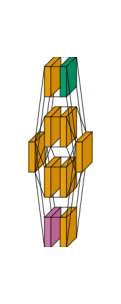
The same Inception-style block as the graph style’s multi-branch example - four parallel
branches (a plain Conv2d+BatchNorm2d, a 1x1-then-3x3 conv, a 1x1-then-5x5 conv, and a
max-pool-then-1x1-conv) that all read the same input and merge into a shared projection layer -
rendered in flow style instead.
Conv2d is orange, BatchNorm2d is green, and MaxPool2d is reddish purple.
from collections import defaultdict

import matplotlib.pyplot as plt
import torch
import visualtorch
from torch import nn


class InceptionBlock(nn.Module):
    """A simplified Inception-style block with four parallel branches."""

    def __init__(self, in_channels: int, out_1x1: int, out_3x3: int, out_5x5: int, out_pool: int) -> None:
        super().__init__()
        self.branch1 = nn.Sequential(
            nn.Conv2d(in_channels, out_1x1, kernel_size=1),
            nn.BatchNorm2d(out_1x1),
        )
        self.branch2 = nn.Sequential(
            nn.Conv2d(in_channels, out_3x3, kernel_size=1),
            nn.Conv2d(out_3x3, out_3x3, kernel_size=3, padding=1),
        )
        self.branch3 = nn.Sequential(
            nn.Conv2d(in_channels, out_5x5, kernel_size=1),
            nn.Conv2d(out_5x5, out_5x5, kernel_size=5, padding=2),
        )
        self.branch4 = nn.Sequential(
            nn.MaxPool2d(kernel_size=3, stride=1, padding=1),
            nn.Conv2d(in_channels, out_pool, kernel_size=1),
        )
        total_channels = out_1x1 + out_3x3 + out_5x5 + out_pool
        self.project = nn.Conv2d(total_channels, total_channels, kernel_size=1)

    def forward(self, x: torch.Tensor) -> torch.Tensor:
        """Run every branch on the same input, then concatenate and project."""
        b1 = self.branch1(x)
        b2 = self.branch2(x)
        b3 = self.branch3(x)
        b4 = self.branch4(x)
        merged = torch.cat([b1, b2, b3, b4], dim=1)
        return self.project(merged)


model = InceptionBlock(in_channels=16, out_1x1=8, out_3x3=8, out_5x5=8, out_pool=8)

input_shape = (1, 16, 16, 16)

color_map: dict = defaultdict(dict)
color_map[nn.Conv2d]["fill"] = "#E69F00"
color_map[nn.BatchNorm2d]["fill"] = "#009E73"
color_map[nn.MaxPool2d]["fill"] = "#CC79A7"

img = visualtorch.render(model, input_shape, style="flow", color_map=color_map, scale_xy=3, spacing=15)

dpi = 150  # rendered at 2x this in the final doc build (savefig.dpi=300 in conf.py)
plt.figure(figsize=(img.width / dpi, img.height / dpi), dpi=dpi)
plt.imshow(img)
plt.axis("off")
plt.tight_layout()
plt.show()