

Note
Go to the end to download the full example code.
Vision Transformer (ViT)#
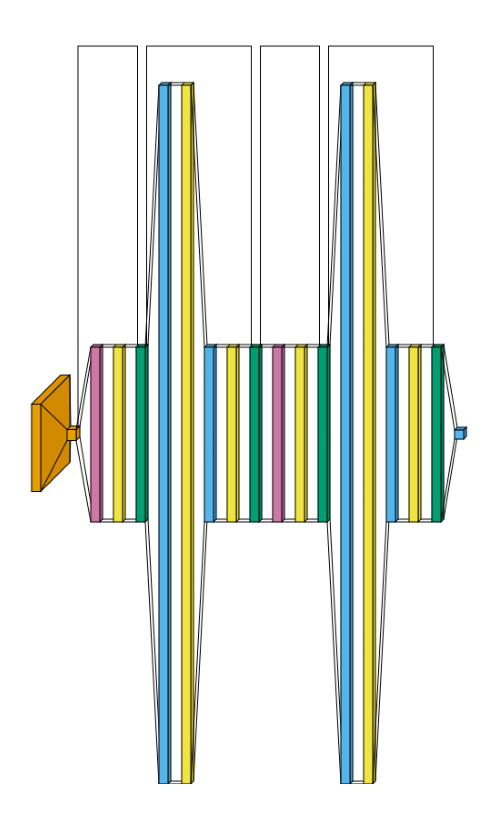
The same small Vision Transformer as the graph style’s ViT example, rendered in flow
style instead. This is a deep, narrow model (many similarly-sized sequential layers), which
flow’s volumetric look tends to render busier/harder to visually parse than graph - included
here for completeness, but graph is the clearer choice for this kind of architecture.
Note: VisualTorch traces the literal module-by-module computation, so this shows the real executed sequence of layers, not the conceptual/pedagogical diagram style used in ViT papers.
Conv2d is orange, MultiheadAttention is reddish purple, Linear is sky blue, LayerNorm is bluish green, and Dropout is yellow.
from collections import defaultdict

import matplotlib.pyplot as plt
import torch
import visualtorch
from torch import nn


class VisionTransformer(nn.Module):
    """A small Vision Transformer: patch embedding + positional embedding + Transformer encoder."""

    def __init__(
        self,
        img_size: int = 32,
        patch_size: int = 8,
        dim: int = 64,
        depth: int = 2,
        heads: int = 4,
        num_classes: int = 10,
    ) -> None:
        super().__init__()
        num_patches = (img_size // patch_size) ** 2
        self.patch_embed = nn.Conv2d(3, dim, kernel_size=patch_size, stride=patch_size)
        self.pos_embed = nn.Parameter(torch.zeros(1, num_patches, dim))
        encoder_layer = nn.TransformerEncoderLayer(d_model=dim, nhead=heads, dim_feedforward=dim * 4, batch_first=True)
        self.encoder = nn.TransformerEncoder(encoder_layer, num_layers=depth)
        self.head = nn.Linear(dim, num_classes)

    def forward(self, x: torch.Tensor) -> torch.Tensor:
        """Split into patches, embed, add positional embedding, encode, then classify."""
        x = self.patch_embed(x)
        x = x.flatten(2).transpose(1, 2)
        x = x + self.pos_embed
        x = self.encoder(x)
        x = x.mean(dim=1)
        return self.head(x)


model = VisionTransformer()

input_shape = (1, 3, 32, 32)

color_map: dict = defaultdict(dict)
color_map[nn.Conv2d]["fill"] = "#E69F00"
color_map[nn.MultiheadAttention]["fill"] = "#CC79A7"
color_map[nn.Linear]["fill"] = "#56B4E9"
color_map[nn.LayerNorm]["fill"] = "#009E73"
color_map[nn.Dropout]["fill"] = "#F0E442"

img = visualtorch.render(model, input_shape, style="flow", color_map=color_map, scale_xy=3, spacing=15)

dpi = 150  # rendered at 2x this in the final doc build (savefig.dpi=300 in conf.py)
plt.figure(figsize=(img.width / dpi, img.height / dpi), dpi=dpi)
plt.imshow(img)
plt.axis("off")
plt.tight_layout()
plt.show()