

Note
Go to the end to download the full example code.
Connector Arrowheads#
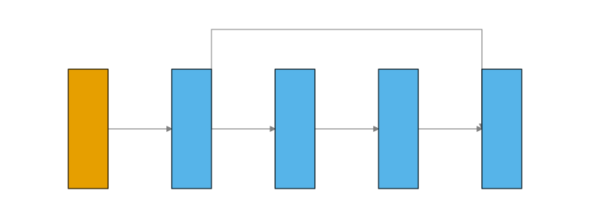
When a graph has skip connections (e.g. a residual block), plain connector lines can
cross each other with no visual cue about data-flow direction. Setting
show_arrows=True draws a small arrowhead at each connector’s downstream endpoint.
The model here is a compact residual block: a main path through two hidden layers plus a skip connection from the stem output into the merge point before the final layer.
import matplotlib.pyplot as plt
import torch
import visualtorch
from torch import nn


class ResidualBlock(nn.Module):
    """A dense residual block with a skip connection around fc1/fc2."""

    def __init__(self) -> None:
        super().__init__()
        self.stem = nn.Linear(4, 4)
        self.fc1 = nn.Linear(4, 4)
        self.fc2 = nn.Linear(4, 4)
        self.out = nn.Linear(4, 2)

    def forward(self, x: torch.Tensor) -> torch.Tensor:
        """Forward pass with a skip connection around fc1/fc2."""
        stem_out = self.stem(x)
        branch = self.fc2(self.fc1(stem_out))
        merged = branch + stem_out
        return self.out(merged)


model = ResidualBlock()
input_shape = (1, 4)

img = visualtorch.render(model, input_shape, style="graph", show_neurons=False, show_arrows=True, layer_spacing=80)

dpi = 150  # rendered at 2x this in the final doc build (savefig.dpi=300 in conf.py)
plt.figure(figsize=(img.width / dpi, img.height / dpi), dpi=dpi)
plt.imshow(img)
plt.axis("off")
plt.tight_layout()
plt.show()