

Note
Go to the end to download the full example code.
Connector Styling#
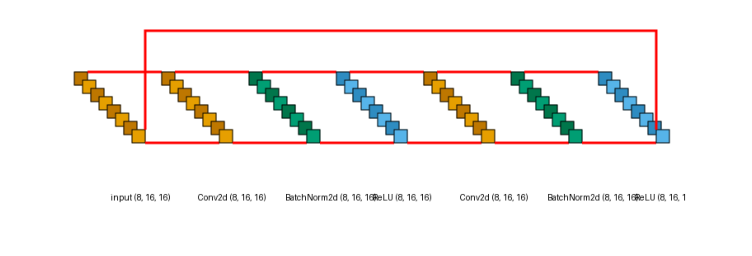
By default, connectors (the lines drawn between layers) are 1 pixel wide and black.
You can customize their appearance using connector_fill and connector_width.
This is particularly useful when highlighting the flow of data through a complex
network, or when dealing with skip connections in a residual model.
Here, we render a residual block with a bold red connector of width 3 to make the data paths stand out.
from collections import defaultdict

import matplotlib.pyplot as plt
import torch
import visualtorch
from torch import nn


class ResidualBlock(nn.Module):
    """A classic ResNet-style block with a plain identity shortcut."""

    def __init__(self, channels: int) -> None:
        super().__init__()
        self.conv1 = nn.Conv2d(channels, channels, kernel_size=3, padding=1)
        self.bn1 = nn.BatchNorm2d(channels)
        self.relu = nn.ReLU()
        self.conv2 = nn.Conv2d(channels, channels, kernel_size=3, padding=1)
        self.bn2 = nn.BatchNorm2d(channels)

    def forward(self, x: torch.Tensor) -> torch.Tensor:
        """Define the forward pass, with a skip connection around conv1/bn1/relu/conv2/bn2."""
        identity = x
        out = self.relu(self.bn1(self.conv1(x)))
        out = self.bn2(self.conv2(out))
        out = out + identity
        return self.relu(out)


model = ResidualBlock(channels=8)

input_shape = (1, 8, 16, 16)

color_map: dict = defaultdict(dict)
color_map[nn.Conv2d]["fill"] = "#E69F00"
color_map[nn.BatchNorm2d]["fill"] = "#009E73"
color_map[nn.ReLU]["fill"] = "#56B4E9"

img = visualtorch.render(
    model,
    input_shape,
    style="lenet",
    color_map=color_map,
    connector_fill="red",
    connector_width=3,
)

dpi = 150  # rendered at 2x this in the final doc build (savefig.dpi=300 in conf.py)
plt.figure(figsize=(img.width / dpi, img.height / dpi), dpi=dpi)
plt.imshow(img)
plt.axis("off")
plt.tight_layout()
plt.show()